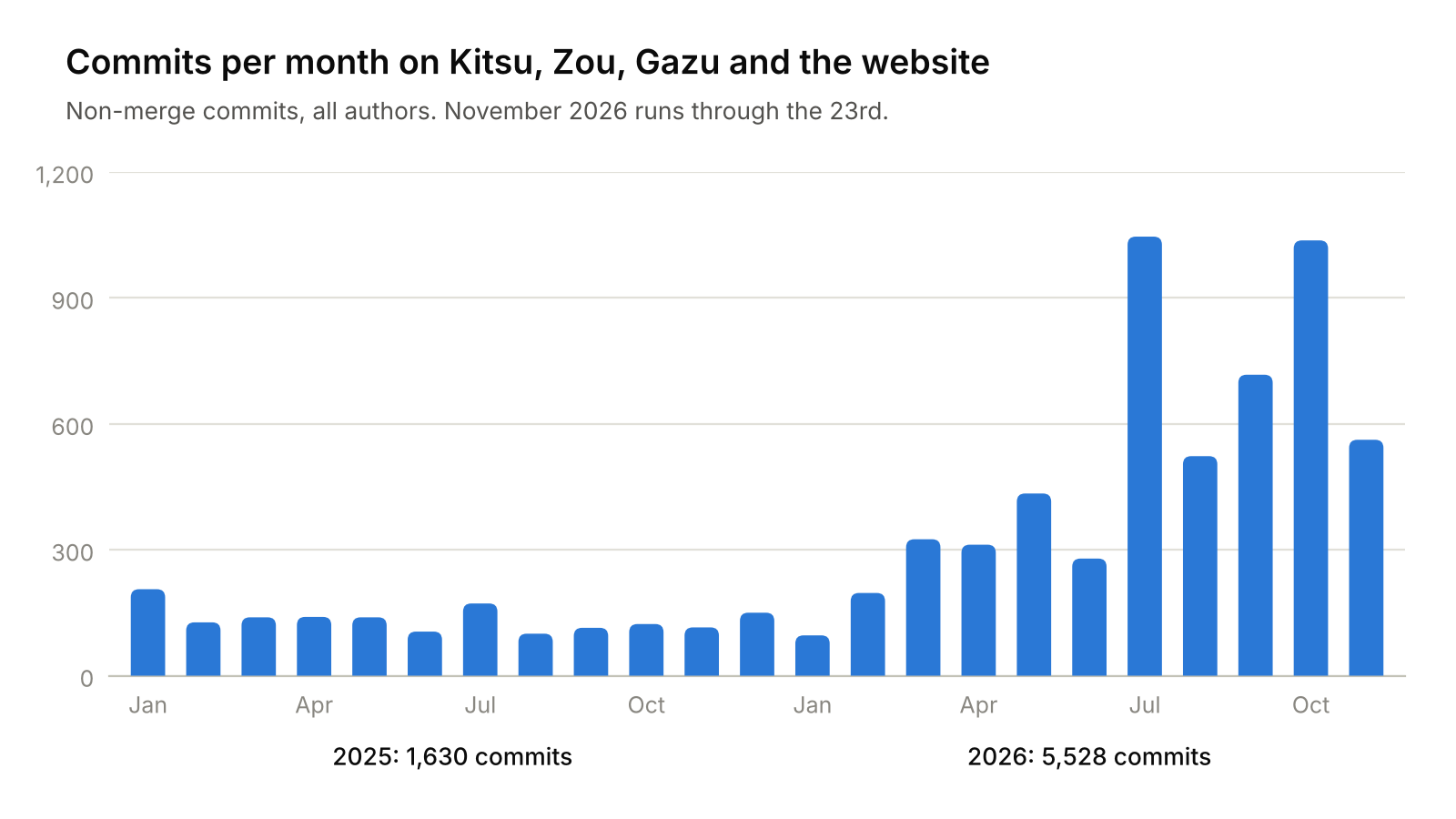
Agentic coding on an open-source project
In this article, I share lessons learned after 10 months of intensive LLM use on an open source project. I also share what changed in the contribution we received at CGWire on our software Kitsu. I end it by explaining my concerns about LLMs and why many developers are still reluctant to use them.
Over the past year, LLM usage in the developer community has evolved drastically, from asking questions and sharing snippets to managing agents that write all the code. It started with autocompletion on steroids, followed by functions and modules written entirely by models. Then the models' progress was so impressive that we ended up delegating all the coding to LLM agents.
Today, the question is no longer whether it's worth using them, but how to get the most out of agents and manage them effectively. But changing habits almost overnight is not simple.
In this article, I will share lessons learned after 10 months of intensive use. I will tell you how I dealt with all the aspects of agentic coding: prompting, context management, skills, reviews, orchestration, and I will share my process to perform large QA operations, run data migration, and write entirely new software. I will also share what changed in the contribution we received at CGWire on our software Kitsu.
Last but not least, I will also explain my concerns about LLMs and why many developers are still reluctant to use them, primarily due to ethical concerns and reliance on third parties.
Context
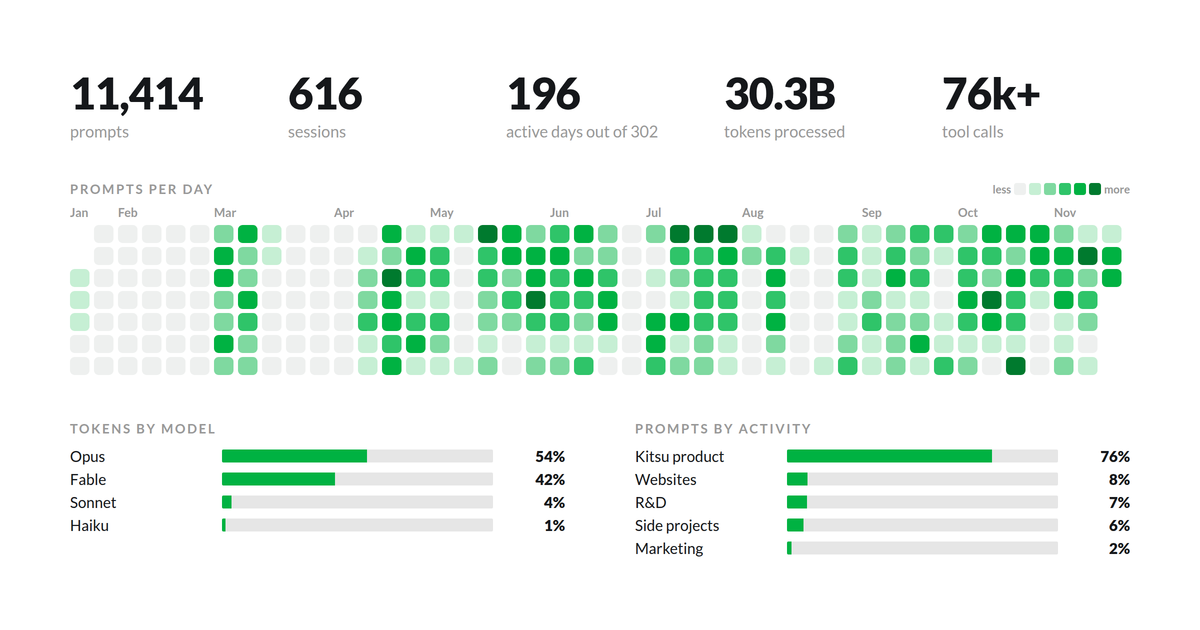
I'm a software engineer with 20 years of professional experience and an entrepreneur. I have worked mainly on open-source code for 15 years. I started to use coding agents/harnesses in January 2026. My experience is primarily with Claude Code. I tried a bit of Cursor and Hermes with Qwen, but due to limited time for exploration, I decided to stick with Claude on the Ultra (formerly Max x20) subscription.
I'm not a developer from a company that can afford API prices. I develop a niche software running in production (Kitsu), with a decent number of daily users (20k). We are a small team of 5, and we don't have access to crazy funding. We spend $600/month on 3 Claude Ultra subscriptions.
I can't do crazy experimentation or extreme changes because businesses have relied on our tool for years. On the other hand, I don't have many limitations on how to do things because I have no hierarchy above me. To make it short, I can implement it freely, but my expenses should remain grounded. To be fair, I was able to use 70B tokens over 10 months because of the current subscription price.
In this article, my goal is to share with you how I get the most out of LLMs via Claude harness within a fixed budget, while still meeting the needs of demanding customers and keeping maintainable software.
I'm listing here the things I achieved so far since January:
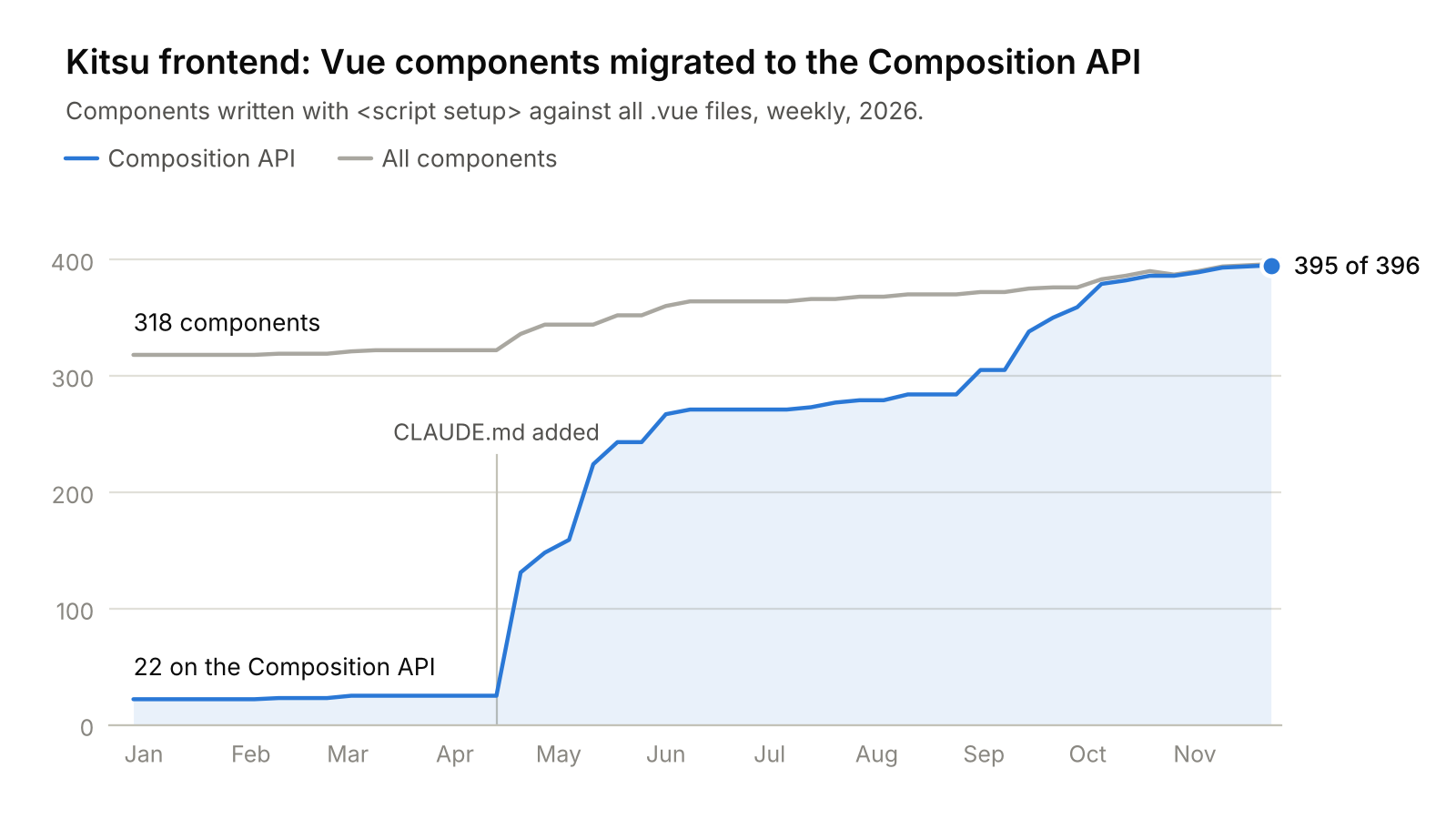
- Migrated our big Vue.js frontend from the options API to the composition API (300 components).
- Turned this non-responsive complex app into a responsive one
- Strengthened our backend security
- Added many long-awaited big features
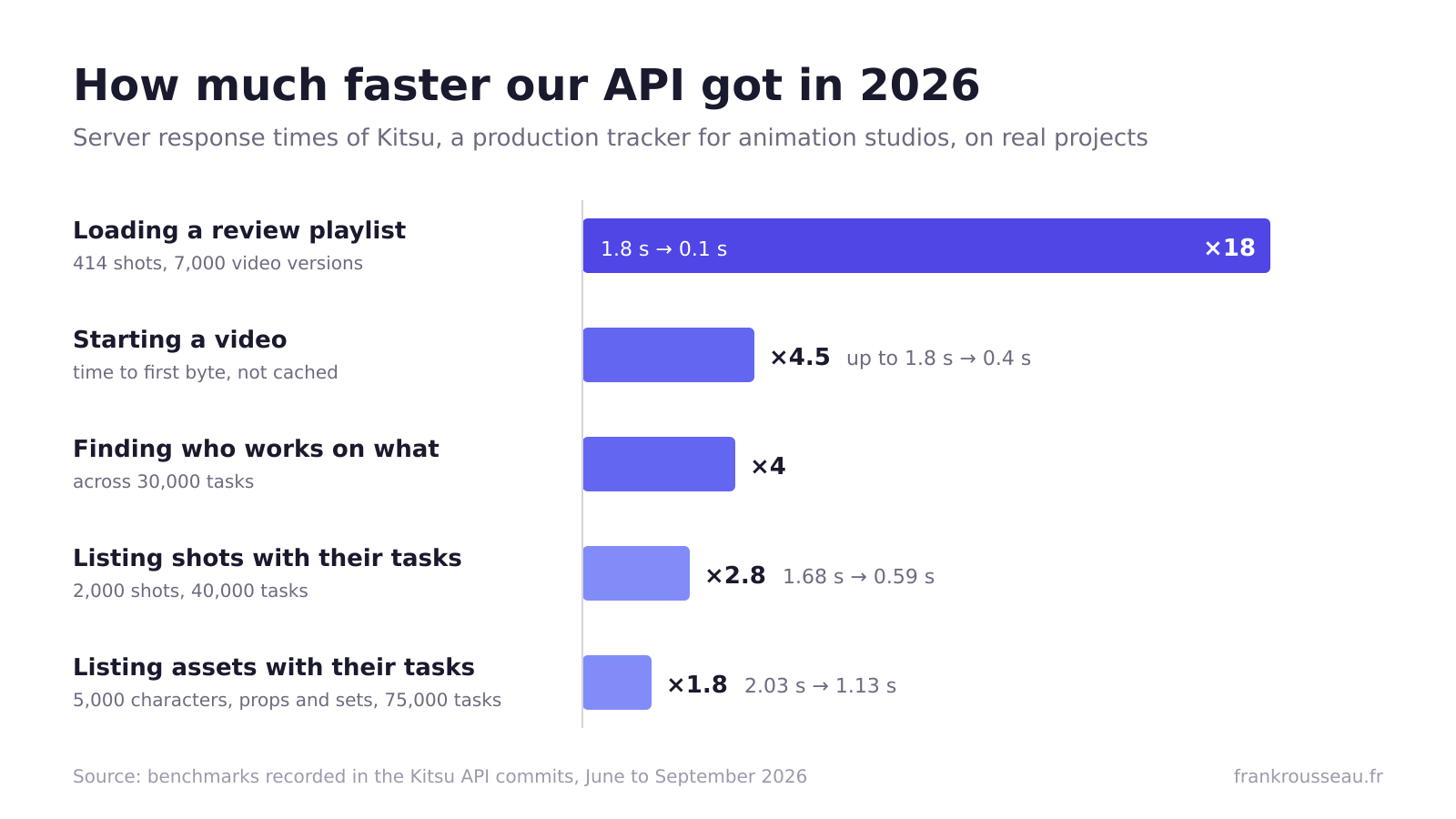
- Improved overall performance
- Fixed some (very) hard bugs
- Fixed countless small bugs
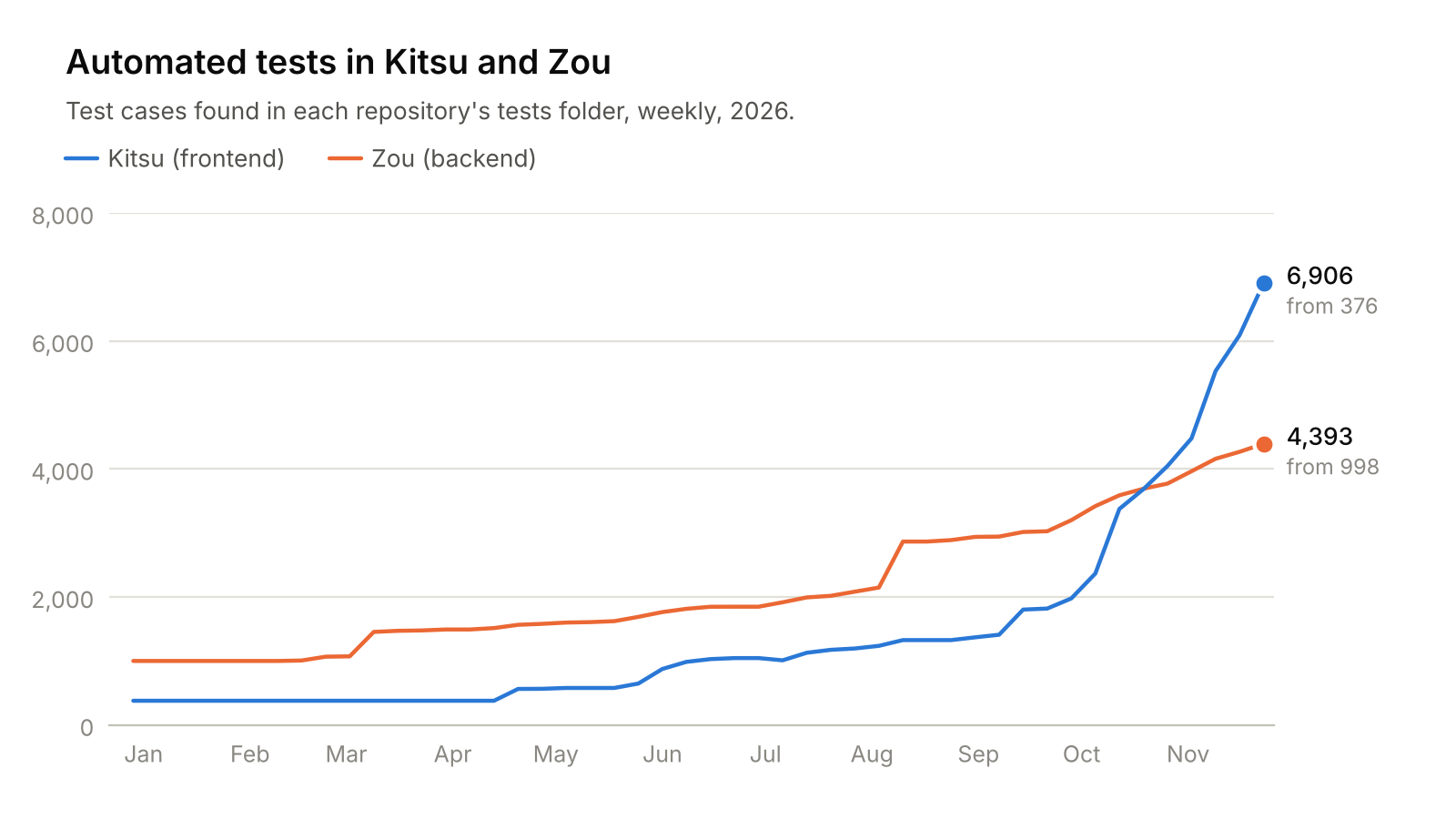
- High test coverage of our application backend
- Added 6500 tests to our frontend
- Cleaned and improved our subscription website
- Applied all best practices to our Python backend (clear OpenAPI specs, Pydantic input validation, code organization)
- Handled 70 open issues and made sure that we don't have more than 10 issues open in parallel since then
- Developed an MCP server for our tool
- Initiated a new big desktop Tauri application
- Implemented a complete JavaScript client for our API.
- As a side project, I also developed a full personal cloud application.
- Cost: Around $2k. At API prices, the same usage would have cost about $30k.
All of these while still managing the company, attending industry events, and handling sales tasks.
Talking with agents (prompting)
What I call an agent is a terminal session where you discuss with a model and ask it to perform actions on your behalf. It is possible to run many sessions in parallel or simply work with a single one. But because the models are slow, I often open several sessions at once.
As for how to write prompts, my main problem was that I've never been enthusiastic about writing detailed specifications. So I decided to start with short prompts and was surprised by how good the results were. The model can also prepare detailed prompts from a few suggestions to send to another agent.
I also quickly figured out that by being a bit evasive, I let the model be creative and propose new ideas. So, when I start a new task, I write a simple prompt describing my situation, review the output, and iterate on it with the LLM. This way, I've always achieved my goal in a reasonable amount of time and benefited from an unexpected way of doing things. I figured out that many small iterations with an LLM are very productive. I've never felt the need to write myself a long and precise initial prompt.
Every time I saw unexpected behavior, I asked it to save it in memory or in the Claude.md file. With time, I got the results I expected in every piece of code. As Quentin Adam, Clever Cloud's CEO, said in a famous French interview, LLMs are "dumb" in the sense that they do what they are told. So, the more precise you are and the more framed you are, the more the coding results will satisfy you. I built this precision iteratively over time.
Because LLMs mimic human behavior, I did my best to remain polite and use an interrogative tone to elicit more interesting answers. On the other hand, if the model looks stressed or peremptory, I ask it to adopt a more neutral tone. Models can be pretty annoying and need to be redirected regularly.
Last but not least, LLMs tend to develop their own jargon, especially as the conversation grows (thanks to AI expert Franck Isabel for pointing this out to me). Because I don't need to feel smart or understand everything they say all the time, and because I've dealt with tons of LLM output, I did my best to make the output as intelligible as possible. Asking the model to be concise and to reformulate when needed has always been useful. Telling it to use the ASD-STE100 convention and using the I-have-adhd skill were also helpful to me.
QA: Codebase
QA is where LLMs shine the most. They know common coding rules and can handle many chores with a single prompt. I noticed that the more I fed them with my coding practice, the better they performed. That's why I sent them links to the language's best practices to refine their behavior. I also asked them to apply our linters' (Black, Prettier) rules. I added my specific rules and enforced everything in the Claude.md file. This way, it applies also to contributors.
Managing comments, API specs, and function documentation was easier than ever. Models handled everything pretty well. Given the sheer volume of code, it made some mistakes, but after two or three passes, it was all right. Models were also helpful in reorganizing project files and avoiding cycles (both of which were done in a different pass). Finally, they were very helpful when implementing a new library (for instance, I integrated Pydantic to validate all inputs to our Flask API with minimal effort). But I did all of this in separate sessions by segmenting the project. If too much data is involved, the model gets confused.
It's very cumbersome to review all these QA changes. So, I just let the tests pass and accepted them. We tested the software before pushing it into production. I reviewed the files later from time to time to check how they looked and whether they remained readable, to ensure the direction stayed correct.
Writing tests is also a cumbersome task that LLMs are well-suited for. They can improve the coverage drastically. Especially when they make new additions. They are always eager to use the TDD methodology. They can also write tests of any kind: unit, functional, or end-to-end. A friend of mine also had them work on a formal proof of his Rust development and was satisfied with the result.
Upgrading dependencies is also much simpler. Most of the time, models will find the migration guide by themselves and will handle it for you.
QA: Tests and security
Once you are satisfied with your code state, you will be able to run automated debugging sessions. This is where I found that Claude loops were interesting. You can ask the model to focus on your modules one by one, ensuring the context isn't too large for each. Of course, this principle applies to any broad actions on the code.
The most important aspect of all this is security. Once I felt the code was clean, well-organized, and debugged, I requested a security audit. The LLM found many issues, but some of them were a bit hairy. So I had to do some arbitration about what I wanted. Overall, it saw many things that were hard to anticipate. It simulated complex scenarios much faster than a human can and showed many unexpected caveats. But even with that, it still missed some security flaws (which I discuss in the contribution section of this article).
In the same vein, I ended by asking for a full audit of my codebase on 8 aspects: architecture, bugs, security, cleanliness, test coverage, performance, documentation, and dependencies. From the report, I asked to establish a to-do list. I removed what I didn't want and ran a loop to apply all the improvements, committing each one. I decided to do this work whenever a new model comes out. I created two skills, one for audits and one for to-do lists, to run them again without much thought.
By applying all these operations to our codebase, I achieved significant time savings. But I had to set limits because LLMs always suggest making further improvements. Being more productive doesn't mean I should do everything perfectly.
When you perform so many operations, the question of a full rewrite comes to the table. I didn't see clear benefits of doing it, and I was afraid of the new problems implied. Our software is already deployed in 400 companies. So, improving the codebase smoothly felt safer for me than doing a big rewrite with unclear benefits.
NB: If we decided to do this rewrite, the strategy would have been simple: making the LLM write functional tests covering the whole API and run the migration afterward. More generally, testing is more important than ever when setting criteria for LLMs.
Over engineering
I noticed that one of the hardest things about using an LLM is knowing when to stop. Models always push you to go further. They always find something to improve or suggest something new you could do.
This is where your expertise is much needed. Good enough no longer means the same thing. Expectations are going to get higher, but you can quickly fall into a feature-and-quality-creep hole. Especially with the yak shaving effect. You start with a problem that reveals another, and another, and a little bug fix leads to a full refactoring of the module you are working on (which is fine, but can be overwhelming at times).
So I decided to prevent it from happening and asked the model not to be too zealous, to go for the shortest solution. I may miss some opportunities, but once I'm out of the iteration phase, I'm very specific about what I want, which makes it more focused. I also looked for skills that try to fix that. Ponytail is the most famous one and has been useful to me in several situations.
Skills
I didn't get the concept at first, but I quickly understood that skills were shortcuts to bigger prompts. In other words, repetitive actions that require a long prompt can be saved as a skill. The harness will automatically load it when required or when mentioned directly.
Hence, I started with no skills. But the next few days, I felt the need to have some. I told the model what I needed, and it wrote a good set for me. After a few weeks, the Claude model proposed several new skills based on my prompt history. Claude also proposed a command to improve existing skills, which has been pretty useful after a month of use.
This simple concept is key to Agent harnesses. Skills are the main tools for setting up your workflow and managing recurring tasks. Whether you need a Sentry issue triage, a PR review, or a PR preparation, they appear to be very handy in most situations.
Once I became familiar with the concept, I looked for pre-made, proven skills on the web: Superpowers, Caveman, Ponytail, Matt Pocock's skills, I have ADHD, ui-ux-pro-max. But these famous skills often cover too many aspects, so I asked Claude to create a subset from them that suits my usage.
NB: Some third-party skills can consume a lot of tokens.
NB2: Some examples of the skills I made: https://github.com/frankrousseau/agent-skills
Memory
What makes the harness smarter is that it manages its own memory. But sometimes, it is necessary to tell it when you want it to remember a specific thing.
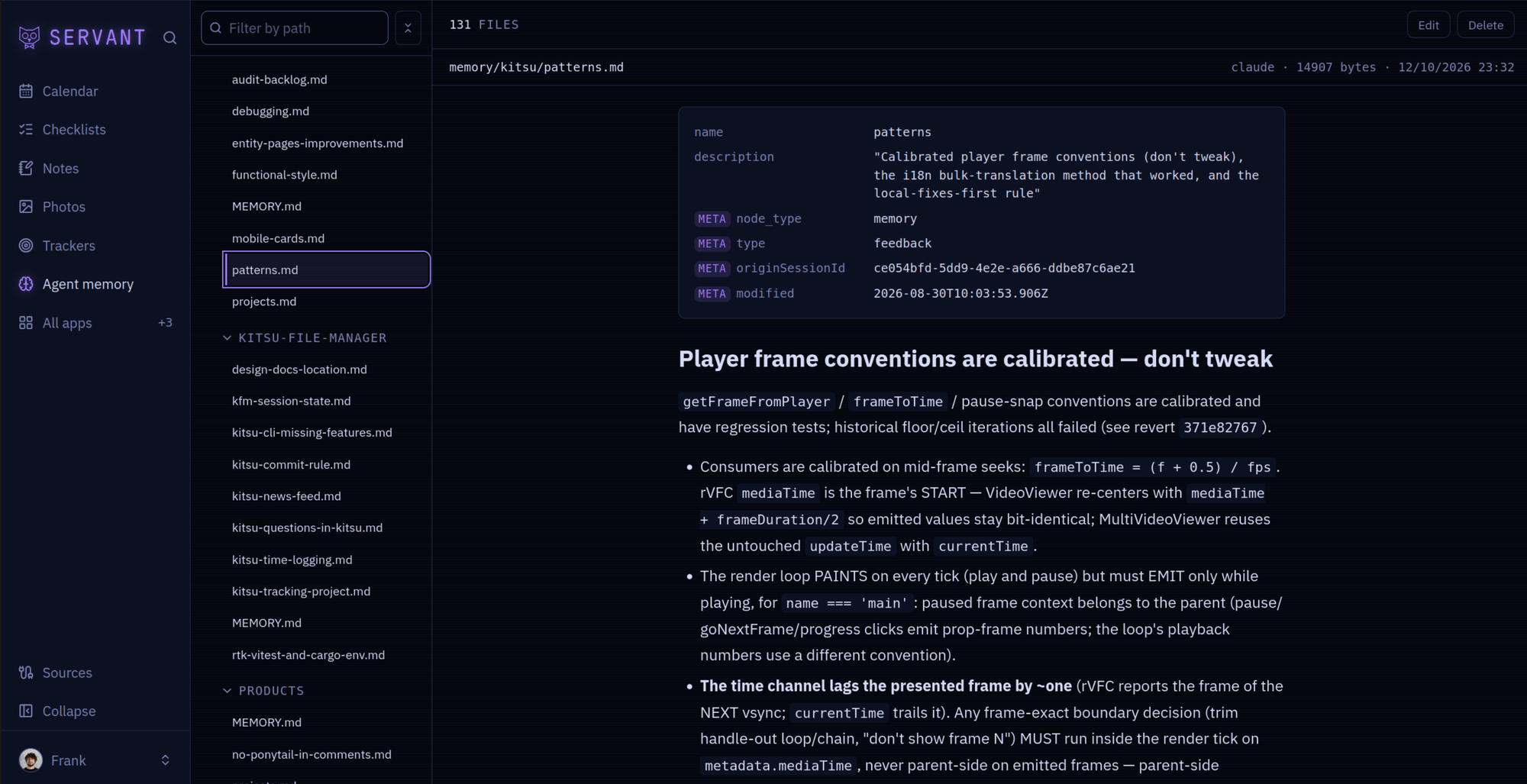
Memory is an efficient system to make better use of the models. Claude harness manages it pretty well, except that the memory and the skills of my desktop computer were not shared with my laptop. Claude proposes a service for this, but I didn't want to depend on it and wanted to make it portable to other harnesses.
To manage this problem, I relied on my own tool. As I mentioned in the context paragraph, in my spare time I vibe-coded a personal cloud (named Servant) that I run on my own server. I used it for many basic purposes (contacts, calendar, photos), and I made it extensible via an app system. So I added an agent memory application that lets me share memory across my devices. It was pretty easy to build, but it required that I set up a dedicated skill on both machines and run them to operate the sync with my server and the local harness.
I ended up with a consistent, evolving memory on both devices and was able to switch easily between them while maintaining control of the system and remaining agnostic about the harness I use.
Data migration
Another painful activity that LLMs cover very well is data migration. Fetching data from a source to import it into another database is a common need. To meet that need, models can quickly investigate schemas and APIs and perform the migration tasks. The issue is that they tend to act on their own by adding data without asking for confirmation, which can be scary.
That's why I decided to always ask for a script instead of letting the model interact directly with data sources. If LLMs are not properly constrained, they can be tempted to anticipate your needs and often fail to do so.
I consider scripts as contracts. The code is deterministic, readable, and ensures that the result meets expectations. It fires on demand and can be interrupted. LLMs align well with this precept and are eager to write scripts for interacting with data.
They spontaneously add a dry-run mode that lets you test the code before running it on production data. So, as a developer, by asking the LLM to generate many logs and iterating on a script, it was much easier to do back-and-forth with it to make the migration work.
With this simple methodology, I was able to extract data from legacy systems and migrate it to Kitsu, and vice versa, in record time. My main issue was more about what to extract from poorly designed data models than performing the migration itself.
Dashboards and documents
LLMs are also useful for communicating with your peers (and agents). Before writing code, I used to make the model generate specs and plans to clarify things for my teammates and me (I stopped quickly when I saw the quantity of output the LLM was capable of). Same for new architecture proposals or changes already made; the model can also quickly generate a Markdown document for you.
At some point, the hype was to ask everything in HTML. I did it several times. It is nice, but LLMs tend to tell too much. It's good to have some diagrams to share, but they're not always useful. On the contrary, Markdown is lightweight and easy to copy and paste. Agents can also consume it faster. So I rarely use HTML explainers.
Then comes the topic of dashboards. Data analysis is another hot topic for models. As you might guess, we have extensively used LLMs to build quick dashboard apps at CGWire. This way, we were able to share a lot of information internally, mainly about our infrastructure and marketing. I also built a small personal one to predict cash balances.
For these kinds of apps, we have a very quick-and-dirty approach with very few QA guidelines and some UI guidelines (sharing a style guide based on our branding, built by Claude Design). These apps are just helpers and are not considered things that should stay.
I also tried video generation, but it was pretty useless (too much fanciness to transmit a simple message). On the other hand, Basile, our marketer, was able to add many cool motion effects to the tutorial videos he makes for the project.
Overall, the benefits of LLMs went beyond the code. They also improved my communication with the team. There is probably something to dig into to improve the company's workflows overall, but not everything can be addressed, even with agent assistance.
Tokens
Tokens are a hot topic on the internet, with contradictory messages: the maxing culture conflicts with the desire to minimize the cost of using AI. To me, it hasn't been a big issue because Claude Ultra subscriptions are pretty generous for the moment. And when I hit the ceiling, I take it as a sign to stop working: that is enough for today.
An important point is that token pricing varies by model, so when using the API, it's best to choose the model wisely. Simple, repetitive operations can be handled by smaller models. Complex debugging requires stronger, more expensive models. I don't have much to say about this because I don't leave the Claude harness.
That said, I did a few things to improve my token consumption. The most efficient one was to set the claude-carbon skill. It always shows me the size of my current context, the API cost equivalent of my session, and the carbon mass I emitted. This way, I always know whether I'm having an efficient session. And because it logs everything, I can ask the model for suggestions based on this data.
Then I set up tools like RTK to save tokens when interacting with the models. They strip unused characters from utilities used by the model.
Another thing I did was avoid mixing subjects in the same terminal. I kept coding session themes separated to avoid confusion and too large contexts. I also compacted and reset my session often by avoiding going beyond 50% of context usage (with large context, it still works, but it brings a lot of noise to every request).
I know there is an over-obsession on the internet with consuming as many tokens as possible and opening as many PRs as possible, but in my context, it felt more like a trap. I just did what I needed and avoided useless iterations by setting as many conventions as possible. As mentioned at the beginning, with the current subscription plan, I have already achieved a lot.
Pushing more code would have just added pressure on my teammates and our users. At some point, overdelivering doesn't help. Not all aspects of the company can be sped up by AI (user training or sales meetings, to name a few).
The main question for me is when I will set up fully automated workflows based on programmatic agents. The model API is much easier to work with, but it will require me to take a more rigorous approach to optimize my token consumption.
Additions and optimizations
Once my QA setup was properly configured, all additions and debugging became much easier. LLMs for sure work well for feature addition, targeted debugging, architecture selection, and performance optimization. But they do it better on a clean codebase.
When I want to build something new, I simply ask for a solution and iterate with it until it's satisfying. It requires more preparation and iterations than QA sessions. UI work is the most tedious. While LLMs write good code, they tend to underdo it with UIs. Overall UI is often good, but many details need to be fixed (spacing, widget choice, brand respect, etc). Building new features requires many iterations to make them clean. Models improved on this aspect, but they mainly stick to their own standards.
Performance optimization is also something LLMs excel at. Almost all code bottlenecks can be fixed. Models are great problem solvers. But sometimes the source of the slowdown moves to another component. In that case, loops can be interesting: they allow us to push the model to think harder until it reaches the expected performance level.
Tickets
User requests can be handled pretty efficiently too, especially bug reports. I was able to resolve 50 old GitHub issues in a few days (and I'm much more responsive to new issues). When I had to handle the large legacy batch, loops were pretty efficient for managing many requests and creating a dedicated PR for each.
Sentry (or a similar system) is also a good source of information for models. The analysis and triage of the reported issues can also be performed by an agent. From this data, agents can fix bugs on their own and provide many directions. Sentry is well adapted to agentic maintenance.
The outputs of your software matter more than ever in agentic coding. Error messages and logs, in general, provide useful additional information for models. It's worth asking the model to make them accurate and clear. Bug fixing is then done faster (it's better for humans too).
Code review
The number of lines generated by models makes the review hard. Delegating the review to an agent is tempting, but the result is pretty noisy, with a lot of nitpicking. Despite the model's efficiency, I was still able to find things the model can't, especially around code cohesion, during a manual review. That said, when too much code is involved, assisted review is the only option.
Sometimes the coding model was not as good as usual. It's a pretty annoying behavior of model providers. From time to time, without being mentioned, the model they serve behaves differently. I ended up with low-end code when I was expecting brilliant work, as usual.
All that said, for some critical code, it was better to review it myself to ensure it stays cohesive and that important features remain understandable. When it comes to bugs, models did much better than I did most of the time.
It may sound contradictory, but when the PR doesn't deserve it and passes tests (such as many small bug fixes or those already reviewed locally by an agent), we merge it directly. Agents can add useless noise. There's no need to ask them to review everything.
I also observed that automated reviews on open-source projects can be painful and often inaccurate (especially when done with poor models). I experienced it on a third-party project, and I didn't like it.
To me, the best option for the maintainer is to merge the PR and do the small fixes with their own LLM. Agentic reviews should just show the main issues or security issues. So when I deal with an external contributor, I prefer to run the model review and keep the result for myself. Then, I share a trimmed result I validated. Otherwise, I let my agents run the fix directly and merge the PR.
To sum up, this is my current policy:
- If the PR is very light and passes the CI, I merge it.
- I don't review cleanup passes. I just let the CI run, and our Product Manager runs extensive tests before the release. From time to time, I read files to see if they are clear and readable.
- For all other cases, I run an agent review.
- I review critical code myself and iterate with LLMs.
- If the contribution matches the product expectation, I handle the change myself and merge it.
- If the contribution doesn't match it, I generate an answer with the LLM, strip it if needed, and post it as a PR comment.
NB: I say this for projects with a manageable number of PRs. For those having many contributions, I guess that automation is mandatory.
NB 2: My seniority is maybe a handicap: is it still worth reviewing anything manually when agents produce way too much code, code better than humans on average, and can do the review for you? Should I simply give up on reviews and run cleaning sessions more often?
New software from scratch
When you start a new software project, it's difficult to read any code: scaffolding will generate way too many lines. Additionally, reviewing stuff that you are not sure to keep seems worthless.
This is where the foundation set during the QA session will be useful. You will be able to add many features without worrying much about the code. Simply ensure that the architecture makes sense. From time to time, I also ran my audit skills and asked to check for obvious refactorings.
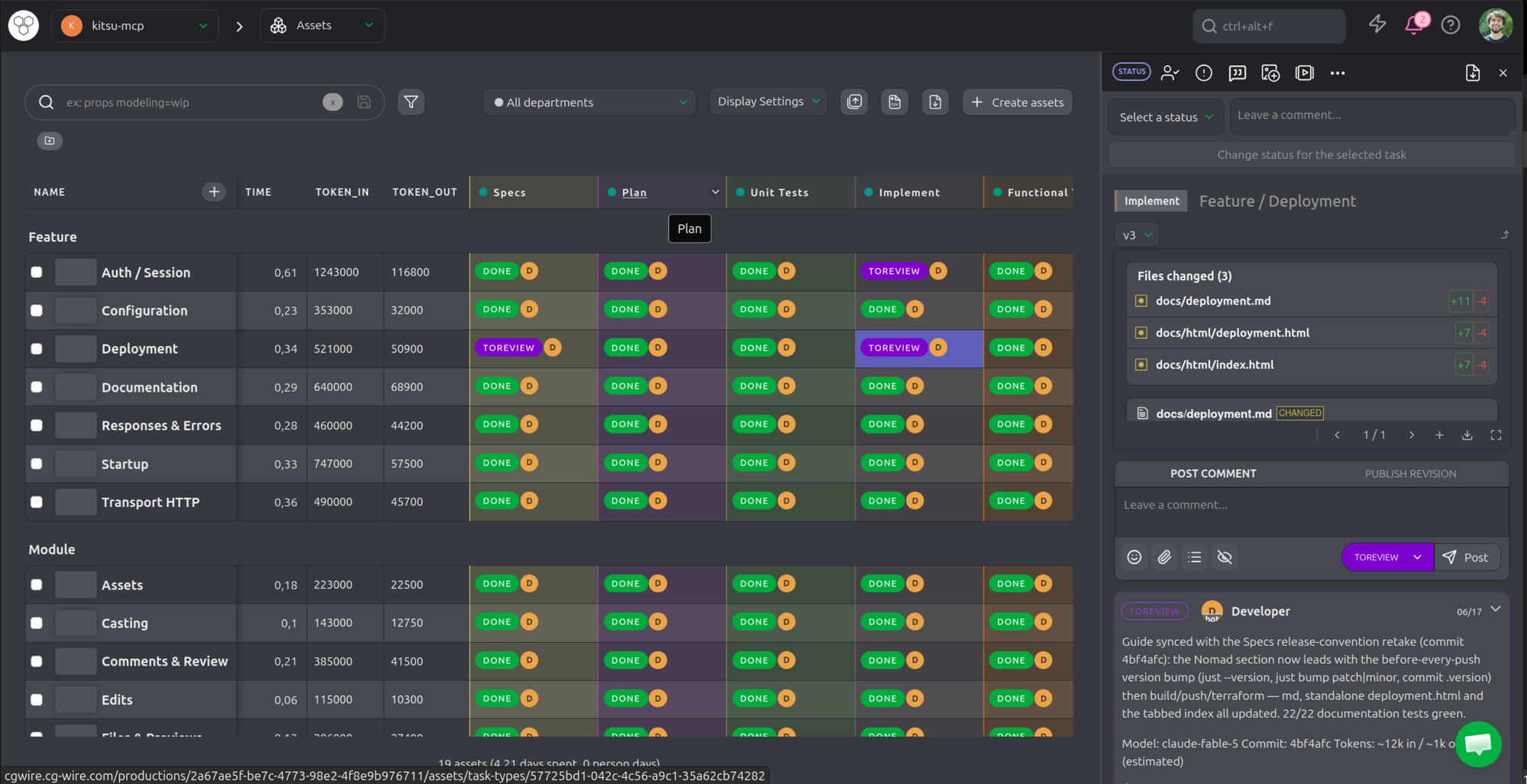
When writing software from scratch, I also experimented with tracking my conversations with Kitsu, our own software. It's a bit complex to explain, but with Kitsu, you can track movie production pipelines; in other words, the same sequence of tasks for each feature (see the picture below as an illustration). In a way, it allows you to have an industrial representation of your project while keeping iterative aspects through recorded conversations.
So via Kitsu, I tracked and stored the prompts, specs, code, token consumption, and the time the agent spent. This way, I had a map and a history of how things were done. The benefit was not obviously useful for a single developer in the sense that prompting directly would have been easier, but it was interesting to keep track of the whole thing, especially if cost analysis would have been needed. But if our new tools are adopted and/or teams grow, this reference will be handy.
NB: I tried Claude's ultracode mode for that. It was nice and fast, but it burnt my tokens quickly. For this reason, I didn't make many attempts. I think it's useful when you know exactly what you are doing, like during a full rewrite or porting a library from one language to another. On my side, I used it to write a JavaScript client for Kitsu based on what we did with our Python client. The result was good, but some audit passes were required afterward.
Orchestration
I didn't go far with orchestration, so I'm just sharing some thoughts and explorations here.
Currently, I don't manage many agents by myself with clear responsibilities. I simply let Claude spawn them as needed and open separate sessions in parallel for different activities, switching between them while the model processes my request.
I did only a single experiment while coding an MCP server for Kitsu. Through a single Claude session, I ran five agents with tasks assigned in Kitsu. They pushed their specs, plan, code, and tests into our tools while reporting their time spent and the tokens consumed. They reviewed each other's work and iterated together. It was interesting to observe, but for a small team like ours, it was a nice-to-have, and it quickly consumed my weekly allocation.
Claude and Codex propose their own systems. They look easy to set up and interesting for complex problems or when you want your agents to iterate more. Among the other tools worth exploring, Hermes Kanban, Cline Kanban (coordination through a tool), and Gas Town (enterprise-like organization) are the most popular for organizing long-term work.
Where I get stuck is that I'm used to iterating when building products. So, letting agents run for an extended period without providing feedback doesn't feel natural. My initial intuition is to set a big goal and refine it during execution.
NB: The initiative that caught my attention the most is OpenBlob. It’s like Docker Compose for agents: you declare a team of agents, their models, and their tools in a .yaml file. Every agent has specific rights and access to isolated tools that run in sandboxed WebAssembly components. They can also communicate with each other. They rely on model APIs or local models. On paper, the architecture is the most solid and flexible I've seen.
Contributions
Kitsu is free and open-source software. This means that we receive contributions. We evolve in a niche market, so the flow is low but still significant. Since the advent of LLMs, we have seen increased participation.
With models, the average contribution quality is much higher, and beginner developers can also propose code changes. As mentioned before, models make the review easier but require additional work to send an intelligible answer.
Security researchers are also more active. We got three pieces of silent feedback (including Bobdahacker!) pointing out security holes that our audits missed. Thanks to their ethics, we were able to fix the problems and deploy them before they became public.
We also implemented a plugin system. Some studios were able to quickly build plugins they shared, and others shared software integrations they built with LLMs.
The only drawback we face is that some contributions to the core of the software require reflection (while before, any addition was an easy yes). Since contributors can achieve more significant results, they are more willing to modify impactful components.
For instance, studios want to extend the customization capabilities of our plugins, while our philosophy has always been to offer a common UI for Kitsu users so they find the same setup when moving from studio to studio. We haven't arbitrated on the topic yet.
Overall, the barrier to entry is lower, and people are more likely to contribute. This enables more collective intelligence on our tool. This is probably the most positive impact of LLMs.
Next steps
My productivity was already largely improved, so I don't want to rush into going deeper. But here are the other things I would like to explore when I find the time for this:
- Dreaming agents: permanent agents iterating and learning on a specific task
- Local AI: getting back control and learning to deal with smaller models
- Harness experiment: comparing different tools and eventually building my own one (actual ones tend to do too many things)
- Agent teams: Digging into OpenBlob to see how a team of agents performs
- Team sharing: Our team acts in silos. By sharing our practices, guidelines, and tooling, we could do better.
- Reactive agents: let agents perform triage and propose fixes on their own when an event occurs (support questions, error logs, Sentry feedback...).
Concerns
In the previous paragraphs, I praised the many benefits of LLMs. But they also come with huge drawbacks. We may find some solutions, but at the time of this writing, they remain unsolved. I'm listing them here:
Broader impact
- Resource consumption: running models requires substantial amounts of natural resources and hardware. We have never reached this scale. The problem is so big that software companies have to arbitrate about how they distribute the model inferences. See 1, 2.
- Human work conditions: The model training datasets are labeled and moderated by underpaid workers, in conditions that Kenyan data workers described as “modern-day slavery”. Your agents rely on that hidden labor, which poses heavy ethical concerns. See 1.
- Privatized commons: models are built from humanity's shared knowledge. Training them requires money and engineering, but it is little compared to the value of that data. Yet a handful of companies own the result and set the price. Access to models should be regulated like water or electricity. See 1.
Dependency
- Cloud dependency: Prior to LLMs, you could code on any computer without an internet connection. If you want to keep LLM productivity, you now need access to model providers or very strong hardware. See Renting is for suckers.
- Model dependency: your code may end up unmaintainable without a model. Given the previous points, it can become a problem (resources will become scarcer, and tokens may become more expensive over time; hence, access to LLMs won't be guaranteed).
- Token price: If I used the API instead of the Claude subscription, I would have spent $30k versus less than $2000 (I didn't use the full subscription at first). Once the price is no longer covered by vendors, drastic optimizations will be required.
Coding experience
- Enemy of minimalism: With LLMs, you tend to achieve all your ideas, creating way more noise and data for your peers. Software development used to shine by finding the most elegant and straightforward solution. It bugs me that we do the strict opposite.
- Project overload: LLMs allow you to build and maintain much more, but the cognitive load is way bigger. From this point of view, they don't relieve you; they give you more work. See The Decoherence Trap.
- End of craftsmanship: fixing hundreds of bugs in a day, adding impactful features in hours, or achieving a massive refactoring in a week will make you feel like you're losing control. The deep understanding of the code, its dependencies, and the hours spent refining it are gone. There is still some pleasure in building something new, but it is not as joyful as before. I'm afraid many software engineers feel depressed. See The End of Software Craftsman.
Psychology
- Brain fry: Dealing with prompts all day while thinking about how to get the most out of it is exhausting. Coding usually exhausts you faster; in a way, it is easier to manage. With agentic coding, it's different; I suddenly feel like I can't think anymore and have to stop working. It's harder to anticipate, and I don't feel as tired as usual. See 1.
- FOMO: The need to master a technology that fast has never occurred before. When a new tech is out, usually people wait for it to mature, such as the good practice around it, before using it. With AI, it feels like everyone should be an expert in something that is not stabilized yet (this article is a good example :)!).
To Conclude
Coding agents revolutionized software engineering. It has changed so much that we can't tell what it will look like to be a developer next year. What we already know is that user expectations will be higher, and it will be difficult for most teams to avoid LLMs.
With the current situation, a small team can already achieve a lot, to the point where bottlenecks move to other departments. And this, on a fixed budget. In some way, we can derive significant benefit from LLMs while staying in current provider plans.
But many major drawbacks remain unaddressed and may become unbearable over time. This could lead to extreme arbitrage. Local AIs can provide solutions, but they will first require significant improvements and better accessibility.
Regarding the serious concerns I mentioned, I don't have a clear answer on whether it is right to use AI. On my side, I don't feel I can say no to this trend. In some way, technofascism incarnates itself in this technology. The playful and addictive aspects of this new thing make the pill easy to swallow. Still, it feels like there is no other choice: march or die. LLMs are wonderful when they are used, but their deployment and governance still require considerable work to ensure safety.
I recommend not pushing anyone to use LLMs. In the current context, most will use them. But if someone on the team doesn't want to, that's totally fine until the main issues I mentioned above are solved. Non-LLM users can participate by maintaining a grounded perspective on the changes made by other team members.
Once the technology is widely adopted, the big question remaining is what we will do when all the major QA work is complete, and the backlogs are cleared. Will it be necessary to go further? How many people will we need to maintain the software? Will we deal with a new kind of software that requires both human and agent power, or will we just end up with fewer software engineers?
NB: This article was written by me, not generated via an LLM. It was spell-checked and lexically improved with Grammarly, and I made some iterations based on the feedback I requested from Claude Opus 5.5 and Fable 5.2.